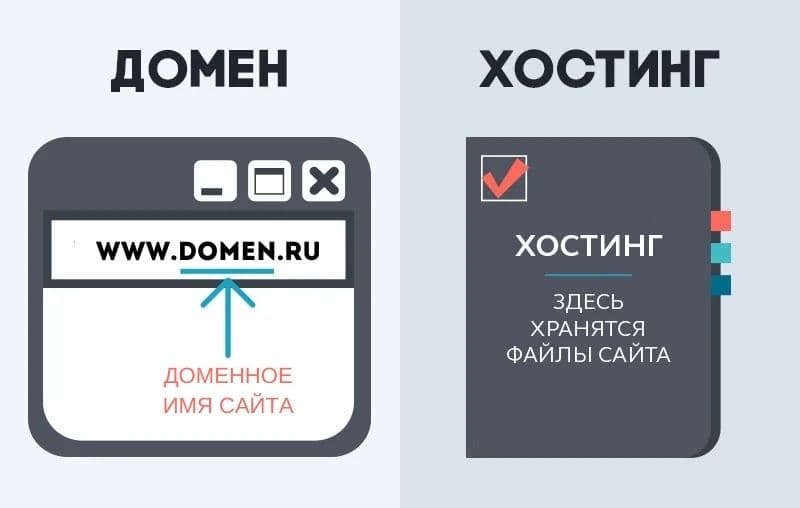
The site is nearly ready, the design is approved and development is on schedule. Then a question often postponed until the final week appears: where will the website live, and how will people find it by name? Hosting and domains can look like a technical formality, yet businesses often lose money here: paying for unnecessary capacity, choosing an unsuitable domain extension or discovering that backups do not exist on the day the site goes down.
This practical guide is for anyone choosing hosting and a domain for the first time, or trying to understand what they are paying for. We cover hosting types, domain selection and registration, technical checks before payment, and the mistakes that cost the most.
Why understand hosting if your contractor handles it?
A developer can choose hosting and configure everything for you. But domain and hosting accounts should belong to the client rather than the contractor: they are your assets. If billing is tied to a developer’s personal account instead of the company, changing contractors or ending the relationship can leave you without access to your own website.
Your hosting choice also directly affects:
- loading speed and, in turn, conversion and search visibility;
- stability under load during promotions and advertising campaigns;
- support costs: underpowered hosting means more time spent resolving failures;
- the ability to scale as traffic or the catalogue grows.
Understanding the basics does not mean administering a server yourself. You need to know which questions to ask and what to check in the contract.
Choosing a domain name and extension
A domain is a website’s internet address, such as qazaqsoft.kz. It consists of a name and a top-level domain extension.
Choose a short, memorable name: longer domains invite typing errors. Avoid hyphens and numbers where possible, as they can reduce recall and trust. Match your brand name as closely as possible to improve recognition and protect against competitors using similar domains. Finally, say it aloud. If it is hard to dictate over the phone, customers will make mistakes when searching.
How should you choose an extension?
| Extension | When it fits |
|---|---|
| .kz | Businesses serving Kazakhstan: builds local audience trust and often performs slightly better in local search |
| .com | International businesses and companies planning to expand beyond Kazakhstan |
| Both .kz and .com | If the budget allows, registering both extensions for the same name helps protect the brand against domain squatting |
| Sector-oriented extensions (.shop, .store, .online) | Rarely the first choice for a main website because unfamiliar extensions may inspire less trust, but useful as additional redirects |
Registration in the .kz zone requires Kazakhstan residency, whether as a legal entity, sole trader or resident individual. This distinguishes it from many international extensions and reduces cybersquatting risk.
Registering a domain and keeping control of it
- Check availability through a domain registrar or a WHOIS service.
- Register the domain to the company rather than an employee’s or contractor’s personal account. If it is registered to an individual, assign an internal owner and provide a second responsible employee with access.
- Store registrar login details separately from work correspondence. You need that access to renew the domain, change DNS records or transfer it to another registrar.
- Enable automatic renewal and use a company payment card rather than a personal card belonging to someone who may leave.
- Check the expiry date annually. A missed renewal is a common reason a website suddenly stops working even when hosting is healthy.
- Enable the registrar’s domain lock if available to protect against unauthorised transfers.
Hosting types: shared, VPS, dedicated and cloud
Shared hosting
One physical server is shared by dozens or hundreds of websites. This is the cheapest option, suitable for landing pages, simple brochure sites and small corporate sites with low traffic. Memory and processing resources are shared, however: a traffic spike on a neighbouring site may slow yours down. Pricing is usually at the lowest end of the market.
VPS (virtual private server)
A physical server is divided into virtual servers, each with an allocated resource allowance independent of its neighbours. VPS hosting suits online stores, CRM systems, growing websites and projects where stability matters. It requires basic server administration skills or a support contractor. It costs more than shared hosting but provides greater control and stability.
Dedicated server
The entire physical server is assigned to one customer. It suits large platforms, marketplaces and high-load systems with substantial data volumes. Full administration is required, usually from a dedicated specialist or support contractor. It costs considerably more than a VPS and is justified only by real workload requirements.
Cloud hosting
Resources are distributed across physical servers and capacity can grow on demand. Cloud hosting suits unpredictable or seasonal workloads, such as an online store before the holidays. Billing often follows actual resource consumption rather than a fixed plan, making costs harder to predict when demand fluctuates substantially.
Technical parameters to check before paying
Before paying for a plan, ask the provider or contractor about:
- Uptime: the stated percentage of time the server operates without interruption. Use 99.9% or higher as a reference; lower figures imply recurring downtime.
- Data-centre location: geographic proximity to your main audience generally improves loading speed.
- Storage and RAM: match the website’s needs and allow headroom for a large catalogue and media files.
- Visitor and traffic limits: some plans impose monthly visit caps, after which a site may slow down or be suspended.
- Technology support: PHP versions, Node.js and databases such as MySQL or PostgreSQL must match the application’s requirements.
- Support speed and quality: clarify contact channels and average response times. Every minute matters during a live-site outage.
- Control panel: cPanel, ISPmanager or an alternative should be understandable to whoever manages the hosting, whether that is you or your support contractor.
Ask a question or leave a request
Have questions about this topic? Tell the Qazaqsoft team what you need.
By submitting the form, you agree to the processing of personal data.
Why you need an SSL certificate and how to enable it
An SSL certificate encrypts the connection between the browser and server. Without it, browsers mark the website as insecure, undermining trust and conversion, while search engines disadvantage sites without SSL.
Free certificates such as Let’s Encrypt suit most websites and renew automatically when configured correctly.
Paid certificates are mainly relevant to larger businesses requiring extended organisational validation, such as banks and fintech projects using EV certificates.
Check whether the plan includes free one-click SSL installation. Many providers offer it, but not all.
Make sure every page uses HTTPS after installation, not just the homepage, or some pages will remain unprotected.
Backups and what happens if the server fails
Backups are often remembered only after an incident, when it is usually too late.
Ask your hosting provider:
- How often are automatic backups made: daily, weekly or less often?
- How many versions are retained, and how far back can the site be restored?
- Are backups physically stored separately or on the same server? Keeping them together does not protect against complete hardware failure.
- Is restoration included in the plan or charged separately?
- Can customers start a restoration themselves, or must provider support do it?
If the provider cannot answer clearly, arrange additional backups through your contractor or an independent backup service.
Hosting in Kazakhstan or abroad?
| Criterion | Hosting in Kazakhstan | Hosting abroad |
|---|---|---|
| Speed for users in Kazakhstan | Usually faster, particularly with a data centre in Almaty or Astana | May be slower without a CDN |
| Personal-data storage | Makes compliance with local rules on storing Kazakhstan citizens’ data easier | Requires an additional check of where data is physically stored |
| Cost | Often lower without currency conversion and customs costs | May be higher or lower depending on the provider and exchange rate |
| Payment | Payment in tenge through familiar local methods | Often requires a card linked to a foreign-currency account |
| Plan selection | Narrower than at major international providers | A broader selection of configurations and capacity |
If the website mainly serves Kazakhstan and processes personal data through enquiries, accounts or payments, local hosting usually simplifies storage compliance and reduces latency. For international projects or sites that do not handle users’ personal data, overseas hosting with a CDN may be appropriate.
Checklist before payment
- The domain is registered to the company, not an employee’s personal account
- At least two responsible employees can access the registrar and hosting accounts
- Automatic renewal is enabled and linked to a company card
- The hosting type—shared, VPS or cloud—matches actual needs
- Provider uptime is at least 99.9%
- The data centre is close to the main audience
- An SSL certificate and free installation are included
- Automatic backups are configured and stored separately from the primary server
- Support terms and response times are clear
- There is a clear upgrade path without moving to another platform